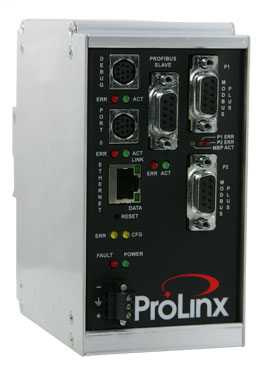

Product image for PROSOFT 5305-MBP-PDPS MODBUS PLUS TO PROFIBUS DP SLAVE

Email

PROSOFT 5305-MBP-PDPS MODBUS PLUS TO PROFIBUS DP SLAVE

Manufacturer: Prosoft Technology, Inc. | Catalog # 5305-MBP-PDPS | North Coast Part # 1002801

$2,525.38 /ea
ea
Log in or register to view your price, purchase history, and more!
Next Day Delivery not avail / contact sales for lead times & return policy
The ProLinx Modbus Plus to PROFIBUS DP Slave Gateway creates a powerful connection between devices on a Modbus Plus network and a PROFIBUS master device. This stand-alone DIN-rail mounted protocol gateway provides one Modbus Plus configurable DB9F port and PROFIBUS DP Slave configurable DB9F port. The Modbus Plus protocol driver supports both Master and Slave implementations of the protocol on the DB9 Female Modbus Plus port. The Modbus Plus port is fully configurable. The PROFIBUS DP Slave protocol driver supports the PROFIBUS V0 Slave implementation, providing powerful data transfer capability between the ProLinx module and Siemens PLCs or other hosts. User configurable data mapping and DP port operation make the interface an easy to use and powerful data transfer tool.

Manufacturer Information

Brand
Prosoft Technology

General Product Info

12-Digit UPC
992231002420
Applications
  • The MBP-PDPS modules are the ideal solution for the many applications where Modbus Plus connectivity can be used to integrate a PROFIBUS DP master device into a system. The Modbus Plus gateway is a powerful module designed with both Master and Slave support, enabling easy connection to other Modbus devices (Modicon processors and many others). In combination with the PROFIBUS DP Slave support, the module provides a very powerful interface to the many PROFIBUS DP master devices which are in use in the industrial marketplace today. Applications for the module are found in most industries, especially the Manufacturing, Oil and Gas, Electrical Power and Food Processing.
Internal Database
  • The ProLinx module contains an internal database that consists of areas for application data, status information, and configuration information.
  • The internal database is shared between all ports on the module and is used as a conduit to pass information from a device on one network to one or more devices on another network.
Configuration Data Area
  • This area contains module configuration information such as port configuration, network information, and command configuration. This configuration file is downloaded to, or uploaded from, this area.
Application Data Area
  • The data area is used to store and retrieve data by the protocol drivers and for data exchange between protocols. The database is used as a source for write commands to remote devices and holds data collected from the remote devices. Commands defined in the configuration file (stored in the configuration data area) control how the data is to be handled in the database.
Status Data Area
  • This area is used to store error codes, counters, and port status information for each port.

Compare